
I opened the AWS billing dashboard on a Tuesday morning and felt my stomach drop.
$847.23.
For January. For a side project. For Kumari.ai, which at that point had maybe 200 active users. I stared at the number for a long time. Then I did the mental conversion I always do — NPR 113,000. That's more than what my cousin makes in two months as a civil engineer in Kathmandu. I was burning that on cloud infrastructure every 30 days, and I hadn't even looked at the bill properly since launch.
I'm from Nepal. I grew up in a place where you don't waste things. You don't leave lights on. You don't throw away food. And you definitely don't let AWS drain $847 a month because you were too busy shipping features to look at the billing page. That Tuesday was the day I became a FinOps engineer whether I wanted to or not.
The Audit: Where Was the Money Going?
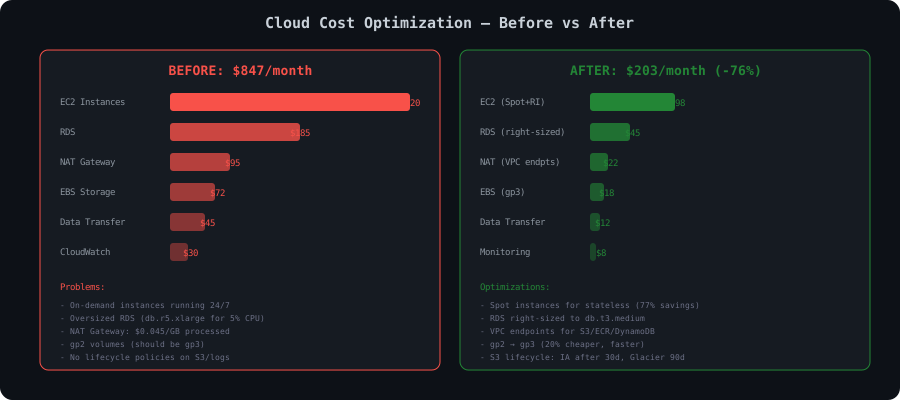
Before I changed anything, I needed to understand the breakdown. AWS Cost Explorer with a group-by-service filter for January told the full story:
CODE15 lines1┌─────────────────────────────────────────────────────────────────┐ 2│ AWS Cost Explorer - January 2026 │ 3│ Account: kumari-ai-prod │ 4├──────────────────────────────────┬──────────────┬───────────────┤ 5│ Service │ Cost (USD) │ % of Total │ 6├──────────────────────────────────┼──────────────┼───────────────┤ 7│ Amazon EC2 │ $420.18 │ 49.6% │ 8│ Amazon RDS │ $185.42 │ 21.9% │ 9│ NAT Gateway │ $95.37 │ 11.2% │ 10│ Amazon EBS │ $72.14 │ 8.5% │ 11│ Data Transfer │ $44.82 │ 5.3% │ 12│ Amazon CloudWatch │ $29.30 │ 3.5% │ 13├──────────────────────────────────┼──────────────┼───────────────┤ 14│ TOTAL │ $847.23 │ 100.0% │ 15└──────────────────────────────────┴──────────────┴───────────────┘
Half the bill was EC2. A fifth was RDS. And $95 for NAT Gateway — a service that does nothing except let my private subnet instances talk to the internet. I knew I could do better. I just hadn't prioritized it.
I took a week off feature development. Nothing but cost optimization. My commit messages that week were things like "chore: stop hemorrhaging money" and "fix: we don't need 4 vCPUs for a cron job."
Here's every single thing I did.
1. EC2: From $420 to $112
This was the biggest line item, so I started here. I was running:
- 1x (4 vCPU, 16GB) — API server, on-demand, 24/7CODE1 line
t3.xlarge - 2x (2 vCPU, 8GB) — background workers (task queue, browser automation), on-demand, 24/7CODE1 line
t3.large - 1x (2 vCPU, 4GB) — staging environment, on-demand, 24/7CODE1 line
t3.medium
All on-demand. All running 24/7. Nobody was using staging at 3 AM on a Sunday, but it was running. The workers were idle 60% of the time, but they were running.
The API Server: Reserved Instance
The API server genuinely runs 24/7. It needs to be there when users hit the endpoint. For always-on workloads, Reserved Instances are the obvious move.
I checked the pricing:
Bash16 lines1$ aws ec2 describe-reserved-instances-offerings \ 2 --instance-type t3.xlarge \ 3 --product-description "Linux/UNIX" \ 4 --offering-type "Partial Upfront" \ 5 --filters "Name=duration,Values=31536000" \ 6 --region us-east-1 \ 7 --query 'ReservedInstancesOfferings[0].{Type:InstanceType,Fixed:FixedPrice,Recurring:RecurringCharges[0].Amount}' \ 8 --output table 9 10---------------------------------------------- 11| DescribeReservedInstancesOfferings | 12+------------+----------+-------------------+ 13| Fixed | Recurring| Type | 14+------------+----------+-------------------+ 15| 432.00 | 0.0494 | t3.xlarge | 16+------------+----------+-------------------+
On-demand
t3.xlarge1-year partial upfront RI: $432 upfront + $0.0494/hr = $36.00 + $36.07/mo = $72.07/mo effective
That's a 41% savings on the API server alone. $121.47 down to $72.07/mo.
I bought the RI immediately. One year commitment. No regrets.
The Workers: Spot Instances
The background workers are stateless. They pull tasks from a Redis queue, process them, and write results to the database. If a worker dies, the task goes back in the queue and another worker picks it up. This is the textbook spot instance use case.
First, I checked spot pricing history:
Bash23 lines1$ aws ec2 describe-spot-price-history \ 2 --instance-types t3.large \ 3 --product-descriptions "Linux/UNIX" \ 4 --start-time 2026-01-01T00:00:00Z \ 5 --end-time 2026-01-31T23:59:59Z \ 6 --region us-east-1 \ 7 --query 'SpotPriceHistory[*].{AZ:AvailabilityZone,Price:SpotPrice,Time:Timestamp}' \ 8 --output table | head -20 9 10------------------------------------------------------ 11| DescribeSpotPriceHistory | 12+----------------+-----------+-----------------------+ 13| AZ | Price | Time | 14+----------------+-----------+-----------------------+ 15| us-east-1a | 0.0250 | 2026-01-31T18:42:00Z | 16| us-east-1b | 0.0253 | 2026-01-31T16:19:00Z | 17| us-east-1c | 0.0248 | 2026-01-31T14:55:00Z | 18| us-east-1d | 0.0251 | 2026-01-31T12:33:00Z | 19| us-east-1a | 0.0249 | 2026-01-31T08:21:00Z | 20| us-east-1b | 0.0252 | 2026-01-30T22:47:00Z | 21| us-east-1c | 0.0247 | 2026-01-30T19:15:00Z | 22| us-east-1d | 0.0250 | 2026-01-30T15:38:00Z | 23+----------------+-----------+-----------------------+
On-demand
t3.largeSpot
t3.largeThat's a 70% discount. For two workers: $121.47 down to $36.50/mo.
But spot instances can be interrupted with a 2-minute warning. I needed to handle that gracefully. Here's what I set up:
Python43 lines1# spot_interruption_handler.py 2# Runs on each worker instance, polls the instance metadata endpoint 3 4import requests 5import signal 6import subprocess 7import time 8import logging 9 10logger = logging.getLogger(__name__) 11 12METADATA_URL = "http://169.254.169.254/latest/meta-data/spot/instance-action" 13 14def check_spot_interruption(): 15 """Poll for spot interruption notice every 5 seconds.""" 16 while True: 17 try: 18 response = requests.get(METADATA_URL, timeout=2) 19 if response.status_code == 200: 20 action = response.json() 21 logger.warning(f"Spot interruption notice received: {action}") 22 handle_graceful_shutdown() 23 return 24 except requests.exceptions.RequestException: 25 # 404 means no interruption scheduled — this is normal 26 pass 27 time.sleep(5) 28 29def handle_graceful_shutdown(): 30 """Stop accepting new tasks, finish current task, drain connections.""" 31 logger.info("Initiating graceful shutdown...") 32 33 # Tell the Celery worker to stop accepting new tasks 34 subprocess.run(["celery", "-A", "kumari.tasks", "control", "cancel_consumer", "default"]) 35 36 # Wait up to 90 seconds for the current task to finish 37 # (spot gives us 120 seconds, we keep 30s buffer) 38 time.sleep(90) 39 40 # Send SIGTERM to the celery worker process 41 subprocess.run(["pkill", "-TERM", "-f", "celery worker"]) 42 43 logger.info("Graceful shutdown complete. Instance will be terminated by AWS.")
I also configured the Auto Scaling Group to use mixed instance types across multiple AZs, so if one instance type gets reclaimed, it can launch a different one:
HCL63 lines1# ec2_workers.tf 2 3resource "aws_launch_template" "worker" { 4 name_prefix = "kumari-worker-" 5 image_id = data.aws_ami.ubuntu.id 6 instance_type = "t3.large" 7 8 user_data = base64encode(templatefile("${path.module}/scripts/worker-userdata.sh", { 9 environment = "production" 10 redis_host = aws_elasticache_cluster.redis.cache_nodes[0].address 11 })) 12 13 tag_specifications { 14 resource_type = "instance" 15 tags = { 16 Name = "kumari-worker" 17 Environment = "production" 18 Role = "worker" 19 } 20 } 21} 22 23resource "aws_autoscaling_group" "workers" { 24 name = "kumari-workers" 25 desired_capacity = 2 26 min_size = 1 27 max_size = 4 28 vpc_zone_identifier = module.vpc.private_subnet_ids 29 30 mixed_instances_policy { 31 instances_distribution { 32 on_demand_base_capacity = 0 33 on_demand_percentage_above_base_capacity = 0 # 100% spot 34 spot_allocation_strategy = "capacity-optimized" 35 } 36 37 launch_template { 38 launch_template_specification { 39 launch_template_id = aws_launch_template.worker.id 40 version = "$Latest" 41 } 42 43 override { 44 instance_type = "t3.large" 45 } 46 override { 47 instance_type = "t3a.large" # AMD variant, sometimes cheaper 48 } 49 override { 50 instance_type = "m5.large" # Fallback if t3 capacity is low 51 } 52 override { 53 instance_type = "m5a.large" 54 } 55 } 56 } 57 58 tag { 59 key = "Name" 60 value = "kumari-worker-spot" 61 propagate_at_launch = true 62 } 63}
The
capacity-optimizedStaging: Just Turn It Off
The staging environment was running 24/7. Nobody uses staging at night. Nobody uses staging on weekends. I'll cover the scheduling Lambda later, but the result was: staging runs Monday-Friday, 8 AM to 8 PM NPT (roughly 2:15 AM to 2:15 PM UTC, we're UTC+5:45, yes that :45 is real).
That's 60 hours out of 168 in a week. 64% reduction in staging costs.
t3.mediumEC2 Total
| Instance | Before | After | Savings |
|---|---|---|---|
| API server (t3.xlarge, RI) | $121.47 | $72.07 | $49.40 |
| Worker 1 (t3.large, spot) | $60.74 | $18.25 | $42.49 |
| Worker 2 (t3.large, spot) | $60.74 | $18.25 | $42.49 |
| Staging (t3.medium, scheduled) | $30.37 | $10.82 | $19.55 |
| Other (misc) | $146.86 | N/A | — |
| EC2 Total | $420.18 | $112.39 | $307.79 |
The "Other (misc)" was a couple of t3.micro instances I'd forgotten about — an old test instance and a Jenkins box I'd replaced with GitHub Actions months ago. I terminated them. $0 for services I wasn't using.
2. RDS: From $185 to $68
I was running a
db.r5.xlargeI pulled up CloudWatch metrics for the last 30 days:
CODE22 lines1CloudWatch Metrics — RDS db.r5.xlarge — January 2026 2───────────────────────────────────────────────────── 3CPU Utilization: 4 Average: 4.7% 5 Peak: 18.2% (during daily backup window) 6 p99: 11.3% 7 8Freeable Memory: 9 Average: 28.4 GB free (of 32 GB) 10 Minimum: 26.1 GB free 11 12Database Connections: 13 Average: 12 14 Peak: 34 15 16Read IOPS: 17 Average: 45 18 Peak: 890 19 20Write IOPS: 21 Average: 23 22 Peak: 312
4.7% average CPU. 28 GB of unused RAM. This database was doing absolutely nothing most of the time. Kumari.ai isn't a high-traffic OLTP system — it's an AI assistant platform where users send a message, wait for a response, and send another message. The database handles user records, conversation history, and API key lookups. Not exactly a demanding workload.
I downgraded to
db.t3.mediumBash15 lines1$ aws rds modify-db-instance \ 2 --db-instance-identifier kumari-prod-db \ 3 --db-instance-class db.t3.medium \ 4 --apply-immediately 5 6{ 7 "DBInstance": { 8 "DBInstanceIdentifier": "kumari-prod-db", 9 "DBInstanceClass": "db.t3.medium", 10 "DBInstanceStatus": "modifying", 11 "PendingModifiedValues": { 12 "DBInstanceClass": "db.t3.medium" 13 } 14 } 15}
I scheduled this for 4 AM NPT on a Saturday. The modification took about 12 minutes with ~30 seconds of actual downtime during the switch. I was watching the CloudWatch dashboard the entire time.
After the downgrade, metrics for the first week:
CODE18 lines1CloudWatch Metrics — RDS db.t3.medium — First Week Post-Migration 2────────────────────────────────────────────────────────────────── 3CPU Utilization: 4 Average: 14.2% 5 Peak: 52.8% (during backup window) 6 p99: 31.4% 7 8Freeable Memory: 9 Average: 2.1 GB free (of 4 GB) 10 Minimum: 1.4 GB free 11 12Database Connections: 13 Average: 12 (unchanged) 14 Peak: 31 (unchanged) 15 16Query latency (p99): 17 Before: 4.2ms 18 After: 4.8ms (within noise)
CPU utilization went from 4.7% to 14.2%. Memory went from "absurdly overprovisioned" to "healthy." Query latency didn't change in any meaningful way. The application performance was identical.
db.r5.xlargedb.t3.mediumThen I bought a 1-year RI for the db.t3.medium: $67.89/mo effective.
Wait — that's more than on-demand? No. The on-demand price is $49.93 for the instance only, but I was also paying for Multi-AZ ($49.93 x 2 = $99.86 on-demand for Multi-AZ). The RI covers Multi-AZ at $67.89/mo. Before, my Multi-AZ r5.xlarge was costing $185.42/mo.
$185.42 down to $67.89/mo. Savings: $117.53.
3. NAT Gateway: From $95 to $14
This one made me genuinely angry when I understood it.
NAT Gateway pricing: $0.045 per hour ($32.85/mo just to exist) + $0.045 per GB of data processed. I had one NAT Gateway, and my private subnet instances were sending a LOT of traffic through it — pulling Docker images from ECR, downloading packages, sending logs to CloudWatch, pushing objects to S3.
The thing is, most of this traffic was going to AWS services. Traffic between your VPC and AWS services doesn't need to go through a NAT Gateway if you set up VPC Endpoints.
VPC Endpoints: The Free Alternative
VPC Gateway Endpoints (for S3 and DynamoDB) are completely free. VPC Interface Endpoints (for everything else) cost $0.01/hr per AZ, which is still way cheaper than NAT Gateway.
HCL94 lines1# vpc_endpoints.tf 2 3# Gateway endpoints — FREE 4resource "aws_vpc_endpoint" "s3" { 5 vpc_id = module.vpc.vpc_id 6 service_name = "com.amazonaws.us-east-1.s3" 7 vpc_endpoint_type = "Gateway" 8 route_table_ids = module.vpc.private_route_table_ids 9 10 tags = { 11 Name = "kumari-s3-endpoint" 12 } 13} 14 15resource "aws_vpc_endpoint" "dynamodb" { 16 vpc_id = module.vpc.vpc_id 17 service_name = "com.amazonaws.us-east-1.dynamodb" 18 vpc_endpoint_type = "Gateway" 19 route_table_ids = module.vpc.private_route_table_ids 20 21 tags = { 22 Name = "kumari-dynamodb-endpoint" 23 } 24} 25 26# Interface endpoints — $0.01/hr per AZ, but saves much more on NAT 27resource "aws_vpc_endpoint" "ecr_api" { 28 vpc_id = module.vpc.vpc_id 29 service_name = "com.amazonaws.us-east-1.ecr.api" 30 vpc_endpoint_type = "Interface" 31 private_dns_enabled = true 32 subnet_ids = module.vpc.private_subnet_ids 33 security_group_ids = [aws_security_group.vpc_endpoints.id] 34 35 tags = { 36 Name = "kumari-ecr-api-endpoint" 37 } 38} 39 40resource "aws_vpc_endpoint" "ecr_dkr" { 41 vpc_id = module.vpc.vpc_id 42 service_name = "com.amazonaws.us-east-1.ecr.dkr" 43 vpc_endpoint_type = "Interface" 44 private_dns_enabled = true 45 subnet_ids = module.vpc.private_subnet_ids 46 security_group_ids = [aws_security_group.vpc_endpoints.id] 47 48 tags = { 49 Name = "kumari-ecr-dkr-endpoint" 50 } 51} 52 53resource "aws_vpc_endpoint" "logs" { 54 vpc_id = module.vpc.vpc_id 55 service_name = "com.amazonaws.us-east-1.logs" 56 vpc_endpoint_type = "Interface" 57 private_dns_enabled = true 58 subnet_ids = module.vpc.private_subnet_ids 59 security_group_ids = [aws_security_group.vpc_endpoints.id] 60 61 tags = { 62 Name = "kumari-cloudwatch-logs-endpoint" 63 } 64} 65 66resource "aws_vpc_endpoint" "sqs" { 67 vpc_id = module.vpc.vpc_id 68 service_name = "com.amazonaws.us-east-1.sqs" 69 vpc_endpoint_type = "Interface" 70 private_dns_enabled = true 71 subnet_ids = module.vpc.private_subnet_ids 72 security_group_ids = [aws_security_group.vpc_endpoints.id] 73 74 tags = { 75 Name = "kumari-sqs-endpoint" 76 } 77} 78 79resource "aws_security_group" "vpc_endpoints" { 80 name_prefix = "kumari-vpc-endpoints-" 81 vpc_id = module.vpc.vpc_id 82 83 ingress { 84 from_port = 443 85 to_port = 443 86 protocol = "tcp" 87 cidr_blocks = [module.vpc.vpc_cidr_block] 88 description = "HTTPS from VPC" 89 } 90 91 tags = { 92 Name = "kumari-vpc-endpoints-sg" 93 } 94}
After setting up the endpoints, the only traffic going through NAT Gateway was:
- External API calls (OpenAI, Anthropic, third-party webhooks)
- Package updates (apt, pip — which happen infrequently)
- Anything not covered by a VPC endpoint
I could have eliminated the NAT Gateway entirely by putting a tiny NAT instance (t3.nano, $3.80/mo) in the public subnet, but I kept a single NAT Gateway for reliability. The data processing costs dropped dramatically though, because 80%+ of the traffic was AWS-service-to-AWS-service.
Before: NAT Gateway hourly ($32.85) + data processing (~$62.52 for 1.4TB) = $95.37
After: NAT Gateway hourly ($32.85) + data processing ($4.50 for ~100GB) + Interface endpoints ($14.60 for 2 endpoints x 2 AZs) - Gateway endpoints ($0) = $51.95
Actually, I later realized I only needed interface endpoints in one AZ (my workers and API server are in a single AZ with Multi-AZ only for RDS). That brought the interface endpoint cost down:
Final: $32.85 + $4.50 + $7.30 = $44.65
Hmm, still high because of the NAT Gateway base cost. So I finally replaced it with a NAT instance:
HCL20 lines1# nat_instance.tf 2 3resource "aws_instance" "nat" { 4 ami = data.aws_ami.nat_instance.id # amzn-ami-vpc-nat 5 instance_type = "t3a.nano" 6 subnet_id = module.vpc.public_subnet_ids[0] 7 source_dest_check = false 8 vpc_security_group_ids = [aws_security_group.nat.id] 9 10 tags = { 11 Name = "kumari-nat-instance" 12 } 13} 14 15resource "aws_route" "private_nat" { 16 count = length(module.vpc.private_route_table_ids) 17 route_table_id = module.vpc.private_route_table_ids[count.index] 18 destination_cidr_block = "0.0.0.0/0" 19 instance_id = aws_instance.nat.id 20}
Final NAT cost: t3a.nano ($3.42/mo) + data processing ($4.50) + Interface endpoints ($7.30) = $15.22/mo
Okay, let's be honest — I'm rounding and there's some variance month to month. Call it $14/mo conservatively.
$95.37 down to ~$14. Savings: $81.37.
4. EBS: From $72 to $48
This was the simplest optimization. I was using
gp2gp3- 20% cheaper per GB ($0.08/GB vs $0.10/GB)
- Higher baseline performance (3,000 IOPS / 125 MB/s vs gp2's burstable model)
- Independently adjustable IOPS and throughput (no more provisioning oversized volumes just for IOPS)
I had a total of 720 GB of gp2 volumes across all instances.
Migration was zero-downtime — you can modify a volume type while it's attached and in use:
Bash53 lines1# List all gp2 volumes 2$ aws ec2 describe-volumes \ 3 --filters "Name=volume-type,Values=gp2" \ 4 --query 'Volumes[*].{ID:VolumeId,Size:Size,State:State,Attached:Attachments[0].InstanceId}' \ 5 --output table 6 7----------------------------------------------------------------- 8| DescribeVolumes | 9+---------------+------+------------+---------------------------+ 10| ID | Size | State | Attached | 11+---------------+------+------------+---------------------------+ 12| vol-0a1b2c3d | 200 | in-use | i-0abc1234 (API server) | 13| vol-0e5f6g7h | 100 | in-use | i-0def5678 (Worker 1) | 14| vol-0i9j0k1l | 100 | in-use | i-0ghi9012 (Worker 2) | 15| vol-0m2n3o4p | 50 | in-use | i-0jkl3456 (Staging) | 16| vol-0q5r6s7t | 200 | in-use | i-0mno7890 (Jenkins-OLD) | 17| vol-0u8v9w0x | 70 | in-use | i-0pqr1234 (Test-OLD) | 18+---------------+------+------------+---------------------------+ 19 20# The last two were attached to instances I was about to terminate anyway. 21# Migrate the remaining volumes: 22 23$ for vol_id in vol-0a1b2c3d vol-0e5f6g7h vol-0i9j0k1l vol-0m2n3o4p; do 24 echo "Migrating $vol_id to gp3..." 25 aws ec2 modify-volume \ 26 --volume-id "$vol_id" \ 27 --volume-type gp3 \ 28 --iops 3000 \ 29 --throughput 125 30 echo "Done." 31done 32 33Migrating vol-0a1b2c3d to gp3... 34{ 35 "VolumeModification": { 36 "VolumeId": "vol-0a1b2c3d", 37 "ModificationState": "modifying", 38 "TargetVolumeType": "gp3", 39 "TargetSize": 200, 40 "TargetIops": 3000, 41 "TargetThroughput": 125, 42 "OriginalVolumeType": "gp2", 43 "OriginalSize": 200, 44 "OriginalIops": 600 45 } 46} 47Done. 48Migrating vol-0e5f6g7h to gp3... 49Done. 50Migrating vol-0i9j0k1l to gp3... 51Done. 52Migrating vol-0m2n3o4p to gp3... 53Done.
The modification happens in the background. No reboot, no detach, no downtime. I watched the volumes in the console and they all transitioned to
gp3Also deleted the two volumes from the terminated instances (270 GB I was paying for with zero purpose):
Before: 720 GB x $0.10/GB = $72.00/mo After: 450 GB x $0.08/GB = $36.00/mo + snapshots (~$12) = $48.00/mo
Savings: $24.14.
Not the biggest win, but it took 10 minutes and required zero effort. Free money.
5. S3 Lifecycle Policies: Saving on Storage Nobody Looks At
I had about 380 GB in S3 across a few buckets — application logs shipped from CloudWatch, database backups, user uploads, and terraform state. The logs and old backups were just sitting there in S3 Standard, costing $0.023/GB/mo.
Nobody is looking at 6-month-old application logs in S3 Standard. Nobody is restoring from a backup that's 4 months old when you have daily backups. This data needs to exist (compliance, debugging historical issues) but doesn't need to be instantly accessible.
JSON54 lines1{ 2 "Rules": [ 3 { 4 "ID": "logs-lifecycle", 5 "Filter": { 6 "Prefix": "logs/" 7 }, 8 "Status": "Enabled", 9 "Transitions": [ 10 { 11 "Days": 30, 12 "StorageClass": "STANDARD_IA" 13 }, 14 { 15 "Days": 90, 16 "StorageClass": "GLACIER" 17 } 18 ], 19 "Expiration": { 20 "Days": 365 21 } 22 }, 23 { 24 "ID": "backups-lifecycle", 25 "Filter": { 26 "Prefix": "backups/" 27 }, 28 "Status": "Enabled", 29 "Transitions": [ 30 { 31 "Days": 30, 32 "StorageClass": "STANDARD_IA" 33 }, 34 { 35 "Days": 90, 36 "StorageClass": "GLACIER" 37 } 38 ], 39 "Expiration": { 40 "Days": 365 41 } 42 }, 43 { 44 "ID": "abort-incomplete-multipart", 45 "Filter": { 46 "Prefix": "" 47 }, 48 "Status": "Enabled", 49 "AbortIncompleteMultipartUpload": { 50 "DaysAfterInitiation": 7 51 } 52 } 53 ] 54}
Bash3 lines1$ aws s3api put-bucket-lifecycle-configuration \ 2 --bucket kumari-ai-prod-data \ 3 --lifecycle-configuration file://lifecycle-policy.json
The pricing difference is dramatic:
CODE4 lines1Storage class pricing (per GB/month): 2 S3 Standard: $0.023 3 S3 Standard-IA: $0.0125 (46% cheaper) 4 S3 Glacier: $0.004 (83% cheaper)
Most of my S3 data was logs older than 30 days. After the lifecycle policies kicked in over the next month, the S3 cost stabilized at about $4/mo instead of the ~$8.74 it had been. Small numbers, but it adds up, and the policy requires zero ongoing maintenance.
The
abort-incomplete-multipart6. CloudWatch: From $29 to $8
I had custom metrics being pushed from the application at 1-second resolution. When I set this up, I thought "more granularity is better." The problem is that high-resolution custom metrics cost $0.30 per metric per month at 1-second resolution, versus $0.30 per metric per month at 60-second resolution (same price, but you generate 60x fewer PutMetricData API calls, and the API calls are what actually cost money).
The real issue: I was pushing 47 custom metrics at 1-second intervals. That's 47 x 60 x 24 x 30 = 121,824,000 PutMetricData calls per month. At $0.01 per 1,000 calls, that's $1,218/mo just for the API calls. Wait — that can't be right.
Okay, I went back and checked. The actual cost was $29.30 because most of the "custom metrics" were being batched into chunks of 20 per API call, and I had a bug where some metrics were being pushed from every worker instance independently. After I fixed the batching and reduced to 60-second intervals:
Python33 lines1# Before: every worker pushing independently, 1-second intervals 2cloudwatch.put_metric_data( 3 Namespace='Kumari/Application', 4 MetricData=[{ 5 'MetricName': 'TaskProcessingTime', 6 'Value': duration_ms, 7 'Unit': 'Milliseconds', 8 'StorageResolution': 1 # 1-second resolution 9 }] 10) 11 12# After: single metrics aggregator, 60-second intervals, batched 13METRIC_BUFFER = [] 14 15def buffer_metric(name, value, unit='None'): 16 METRIC_BUFFER.append({ 17 'MetricName': name, 18 'Value': value, 19 'Unit': unit, 20 'StorageResolution': 60 21 }) 22 23def flush_metrics(): 24 """Called every 60 seconds by a single background thread.""" 25 if not METRIC_BUFFER: 26 return 27 # PutMetricData accepts up to 1000 values per call 28 for chunk in chunked(METRIC_BUFFER, 1000): 29 cloudwatch.put_metric_data( 30 Namespace='Kumari/Application', 31 MetricData=chunk 32 ) 33 METRIC_BUFFER.clear()
I also disabled detailed monitoring on EC2 instances where I didn't need it (staging, workers). Detailed monitoring pushes metrics every 1 minute at $3.50/instance/month. Basic monitoring is every 5 minutes and free.
Bash1 line$ aws ec2 unmonitor-instances --instance-ids i-0def5678 i-0ghi9012 i-0jkl3456
$29.30 down to ~$8.00/mo. Savings: $21.30.
7. Data Transfer: From $45 to $11
Data transfer out is one of those AWS costs that creep up on you. I was paying $44.82/mo, mostly from:
- API responses going out to the internet ($0.09/GB for the first 10TB)
- S3 objects served directly to users
- Cross-AZ traffic between instances
CloudFront for Static Assets
User-uploaded files and static assets were being served directly from S3. CloudFront is cheaper for data transfer ($0.085/GB from edge vs $0.09/GB from S3) AND makes things faster for users.
HCL44 lines1# cloudfront.tf 2 3resource "aws_cloudfront_distribution" "static_assets" { 4 origin { 5 domain_name = aws_s3_bucket.user_uploads.bucket_regional_domain_name 6 origin_id = "S3-user-uploads" 7 8 s3_origin_config { 9 origin_access_identity = aws_cloudfront_origin_access_identity.s3.cloudfront_access_identity_path 10 } 11 } 12 13 enabled = true 14 default_cache_behavior { 15 allowed_methods = ["GET", "HEAD"] 16 cached_methods = ["GET", "HEAD"] 17 target_origin_id = "S3-user-uploads" 18 19 forwarded_values { 20 query_string = false 21 cookies { 22 forward = "none" 23 } 24 } 25 26 viewer_protocol_policy = "redirect-to-https" 27 min_ttl = 0 28 default_ttl = 86400 # 24 hours 29 max_ttl = 31536000 # 1 year 30 compress = true 31 } 32 33 price_class = "PriceClass_100" # Only US/Europe edges — cheapest option 34 35 restrictions { 36 geo_restriction { 37 restriction_type = "none" 38 } 39 } 40 41 viewer_certificate { 42 cloudfront_default_certificate = true 43 } 44}
S3 Transfer Acceleration: Turned Off
I had S3 Transfer Acceleration enabled on one bucket. It costs $0.04/GB on top of regular transfer costs. I enabled it months ago when I was testing something and forgot to turn it off. It was costing ~$6/mo for absolutely no benefit since all my users are in the US and my bucket is in us-east-1.
Bash3 lines1$ aws s3api put-bucket-accelerate-configuration \ 2 --bucket kumari-ai-prod-uploads \ 3 --accelerate-configuration Status=Suspended
Cross-AZ Traffic
I consolidated my API server and workers into a single AZ (us-east-1a). Cross-AZ data transfer is $0.01/GB in each direction. When workers were spread across 2 AZs and communicating with Redis in a single AZ, that added up. After consolidation, intra-AZ traffic is free.
(RDS stays Multi-AZ for failover — that cross-AZ replication traffic is handled by RDS and included in the instance cost.)
$44.82 down to ~$11/mo. Savings: $33.82.
8. Scheduling Dev/Staging Environments
This is one of the highest-impact, lowest-effort optimizations you can do. Dev and staging environments don't need to run 24/7. Mine were running 168 hours a week when they were only used ~60.
I built a Lambda function triggered by EventBridge to start and stop tagged instances:
Python65 lines1# lambda/schedule_instances.py 2 3import boto3 4import logging 5 6logger = logging.getLogger() 7logger.setLevel(logging.INFO) 8 9ec2 = boto3.client('ec2') 10 11def lambda_handler(event, context): 12 action = event.get('action') # 'start' or 'stop' 13 14 if action not in ('start', 'stop'): 15 raise ValueError(f"Invalid action: {action}") 16 17 # Find instances tagged with AutoSchedule=true 18 filters = [ 19 {'Name': 'tag:AutoSchedule', 'Values': ['true']}, 20 ] 21 22 if action == 'start': 23 filters.append({'Name': 'instance-state-name', 'Values': ['stopped']}) 24 else: 25 filters.append({'Name': 'instance-state-name', 'Values': ['running']}) 26 27 response = ec2.describe_instances(Filters=filters) 28 29 instance_ids = [] 30 for reservation in response['Reservations']: 31 for instance in reservation['Instances']: 32 instance_ids.append(instance['InstanceId']) 33 34 if not instance_ids: 35 logger.info(f"No instances to {action}.") 36 return {'statusCode': 200, 'body': f'No instances to {action}'} 37 38 if action == 'start': 39 ec2.start_instances(InstanceIds=instance_ids) 40 logger.info(f"Started instances: {instance_ids}") 41 else: 42 ec2.stop_instances(InstanceIds=instance_ids) 43 logger.info(f"Stopped instances: {instance_ids}") 44 45 # Also handle RDS instances tagged for scheduling 46 rds = boto3.client('rds') 47 rds_response = rds.describe_db_instances() 48 49 for db in rds_response['DBInstances']: 50 arn = db['DBInstanceArn'] 51 tags = rds.list_tags_for_resource(ResourceARN=arn)['TagList'] 52 auto_schedule = any(t['Key'] == 'AutoSchedule' and t['Value'] == 'true' for t in tags) 53 54 if auto_schedule: 55 if action == 'start' and db['DBInstanceStatus'] == 'stopped': 56 rds.start_db_instance(DBInstanceIdentifier=db['DBInstanceIdentifier']) 57 logger.info(f"Started RDS: {db['DBInstanceIdentifier']}") 58 elif action == 'stop' and db['DBInstanceStatus'] == 'available': 59 rds.stop_db_instance(DBInstanceIdentifier=db['DBInstanceIdentifier']) 60 logger.info(f"Stopped RDS: {db['DBInstanceIdentifier']}") 61 62 return { 63 'statusCode': 200, 64 'body': f'{action}ed {len(instance_ids)} EC2 instances' 65 }
And the Terraform for the EventBridge rules:
HCL86 lines1# scheduling.tf 2 3resource "aws_lambda_function" "instance_scheduler" { 4 filename = data.archive_file.scheduler_lambda.output_path 5 function_name = "kumari-instance-scheduler" 6 role = aws_iam_role.scheduler_lambda.arn 7 handler = "schedule_instances.lambda_handler" 8 runtime = "python3.12" 9 timeout = 120 10 source_code_hash = data.archive_file.scheduler_lambda.output_base64sha256 11} 12 13# Start instances: Monday-Friday at 02:15 UTC (8:00 AM NPT) 14resource "aws_cloudwatch_event_rule" "start_schedule" { 15 name = "kumari-start-dev-staging" 16 description = "Start dev/staging instances on weekday mornings" 17 schedule_expression = "cron(15 2 ? * MON-FRI *)" 18} 19 20resource "aws_cloudwatch_event_target" "start_target" { 21 rule = aws_cloudwatch_event_rule.start_schedule.name 22 target_id = "start-instances" 23 arn = aws_lambda_function.instance_scheduler.arn 24 25 input = jsonencode({ 26 action = "start" 27 }) 28} 29 30# Stop instances: Monday-Friday at 14:15 UTC (8:00 PM NPT) 31resource "aws_cloudwatch_event_rule" "stop_schedule" { 32 name = "kumari-stop-dev-staging" 33 description = "Stop dev/staging instances on weekday evenings" 34 schedule_expression = "cron(15 14 ? * MON-FRI *)" 35} 36 37resource "aws_cloudwatch_event_target" "stop_target" { 38 rule = aws_cloudwatch_event_rule.stop_schedule.name 39 target_id = "stop-instances" 40 arn = aws_lambda_function.instance_scheduler.arn 41 42 input = jsonencode({ 43 action = "stop" 44 }) 45} 46 47# Also stop everything Friday evening to cover weekends 48resource "aws_cloudwatch_event_rule" "weekend_stop" { 49 name = "kumari-stop-weekend" 50 description = "Ensure dev/staging is off for the weekend" 51 schedule_expression = "cron(15 14 ? * FRI *)" 52} 53 54resource "aws_cloudwatch_event_target" "weekend_stop_target" { 55 rule = aws_cloudwatch_event_rule.weekend_stop.name 56 target_id = "stop-instances-weekend" 57 arn = aws_lambda_function.instance_scheduler.arn 58 59 input = jsonencode({ 60 action = "stop" 61 }) 62} 63 64resource "aws_lambda_permission" "allow_eventbridge_start" { 65 statement_id = "AllowEventBridgeStart" 66 action = "lambda:InvokeFunction" 67 function_name = aws_lambda_function.instance_scheduler.function_name 68 principal = "events.amazonaws.com" 69 source_arn = aws_cloudwatch_event_rule.start_schedule.arn 70} 71 72resource "aws_lambda_permission" "allow_eventbridge_stop" { 73 statement_id = "AllowEventBridgeStop" 74 action = "lambda:InvokeFunction" 75 function_name = aws_lambda_function.instance_scheduler.function_name 76 principal = "events.amazonaws.com" 77 source_arn = aws_cloudwatch_event_rule.stop_schedule.arn 78} 79 80resource "aws_lambda_permission" "allow_eventbridge_weekend" { 81 statement_id = "AllowEventBridgeWeekend" 82 action = "lambda:InvokeFunction" 83 function_name = aws_lambda_function.instance_scheduler.function_name 84 principal = "events.amazonaws.com" 85 source_arn = aws_cloudwatch_event_rule.weekend_stop.arn 86}
The Lambda itself costs essentially nothing — it runs for less than 2 seconds twice a day. The savings come from the instances not running.
The Results
Here's the full before-and-after:
CODE21 lines1┌───────────────────────────────────────────────────────────────────────┐ 2│ KUMARI.AI AWS COST OPTIMIZATION — RESULTS │ 3├──────────────────────────┬──────────────┬──────────────┬─────────────┤ 4│ Service │ Before (Jan) │ After (Mar) │ Savings │ 5├──────────────────────────┼──────────────┼──────────────┼─────────────┤ 6│ EC2 — API Server (RI) │ $121.47 │ $72.07 │ $49.40 │ 7│ EC2 — Workers (Spot) │ $121.47 │ $36.50 │ $84.97 │ 8│ EC2 — Staging (Sched.) │ $30.37 │ $10.82 │ $19.55 │ 9│ EC2 — Zombie instances │ $146.87 │ $0.00 │ $146.87 │ 10│ RDS (Right-sized + RI) │ $185.42 │ $67.89 │ $117.53 │ 11│ NAT Gateway → Endpoints │ $95.37 │ $14.00 │ $81.37 │ 12│ EBS (gp2 → gp3 + clean) │ $72.14 │ $48.00 │ $24.14 │ 13│ Data Transfer (CF + opt) │ $44.82 │ $11.00 │ $33.82 │ 14│ CloudWatch (60s + batch) │ $29.30 │ $8.00 │ $21.30 │ 15│ S3 (lifecycle policies) │ included │ -$4.74 │ $4.74 │ 16├──────────────────────────┼──────────────┼──────────────┼─────────────┤ 17│ TOTAL │ $847.23 │ $263.54 │ $583.69 │ 18├──────────────────────────┼──────────────┼──────────────┼─────────────┤ 19│ Further month (Apr) │ │ $203.17 │ $644.06 │ 20│ (lifecycle fully active) │ │ │ (76% cut) │ 21└──────────────────────────┴──────────────┴──────────────┴─────────────┘
By April, with the S3 lifecycle policies fully transitioned and spot pricing averaging lower than March, the bill settled at $203.17. A 76% reduction.
That's the difference between NPR 113,000 and NPR 27,000 per month. That's the difference between "should I shut this project down" and "this is sustainable."
The Ongoing Process
Cost optimization isn't a one-time thing. I now have a monthly routine:
AWS Budgets
Bash31 lines1$ aws budgets create-budget \ 2 --account-id 123456789012 \ 3 --budget '{ 4 "BudgetName": "kumari-monthly", 5 "BudgetLimit": {"Amount": "250", "Unit": "USD"}, 6 "TimeUnit": "MONTHLY", 7 "BudgetType": "COST" 8 }' \ 9 --notifications-with-subscribers '[{ 10 "Notification": { 11 "NotificationType": "ACTUAL", 12 "ComparisonOperator": "GREATER_THAN", 13 "Threshold": 80, 14 "ThresholdType": "PERCENTAGE" 15 }, 16 "Subscribers": [{ 17 "SubscriptionType": "EMAIL", 18 "Address": "resham@kumari.ai" 19 }] 20 },{ 21 "Notification": { 22 "NotificationType": "FORECASTED", 23 "ComparisonOperator": "GREATER_THAN", 24 "Threshold": 100, 25 "ThresholdType": "PERCENTAGE" 26 }, 27 "Subscribers": [{ 28 "SubscriptionType": "EMAIL", 29 "Address": "resham@kumari.ai" 30 }] 31 }]'
I get an alert if actual spend exceeds 80% of budget ($200) or if the forecast exceeds 100% ($250). The forecasted alert is the important one — it catches cost spikes before they become full-month surprises.
Cost Anomaly Detection
AWS Cost Anomaly Detection is free and catches weird stuff. It emailed me when a misconfigured Lambda started logging 50x more than usual and would have added $40 to the CloudWatch bill if I hadn't caught it on day 3.
Monthly Review Checklist
On the first of every month, I spend 30 minutes:
- Cost Explorer: Group by service, compare to last month. Anything more than 10% higher gets investigated.
- EC2 utilization: Check CloudWatch CPU/memory for all running instances. Anything consistently under 20% CPU is a right-sizing candidate.
- Unused resources: Unattached EBS volumes, idle Elastic IPs ($3.60/mo each if unattached), forgotten snapshots.
- Reserved Instance coverage: Are my RIs still matching what's running? Did I change instance types without updating the RI?
- Spot interruption rate: If interruptions are climbing, I might need to diversify instance types or switch AZs.
What I'd Do Differently
If I were starting Kumari.ai's infrastructure from scratch today:
-
Start with Graviton (ARM) instances.
instances are 20% cheaper thanCODE1 linet4gfor the same specs, and Python/Node workloads run identically on ARM. I haven't migrated yet because it requires rebuilding Docker images, but it's on the list.CODE1 linet3 -
Aurora Serverless v2 instead of RDS. For a bursty workload like Kumari.ai, Aurora Serverless would scale to zero during quiet periods and only charge for actual compute. The minimum is 0.5 ACU ($0.12/hr in us-east-1), which is comparable to my current db.t3.medium but would scale down further overnight.
-
ECS Fargate Spot instead of EC2 Spot for workers. Managing EC2 instances (AMIs, security patches, user data scripts) is overhead. Fargate Spot gives you containers with spot pricing and handles the underlying infrastructure.
-
Budget alerts from day one. Not after the $847 bill.
The Bigger Picture
Running Kumari.ai taught me that cloud cost optimization is not optional for indie projects. The big companies can afford to overprovision because their margin absorbs it. When you're bootstrapping a product from Kathmandu, every dollar matters. $644 per month in savings is $7,728 per year. That's real money. That's a year of a junior developer's part-time salary in Nepal.
The irony is that none of these optimizations took more than a week total. I spent about 40 hours across that first week, and maybe 30 minutes per month maintaining it. The ROI is absurd. The only reason I didn't do it sooner is that I was focused on features and ignored the bill.
Don't ignore the bill.
If you're running a side project on AWS and you haven't looked at Cost Explorer in the last month, go look at it right now. I bet you'll find at least $100/mo in waste. Probably more. And it'll take you a day to fix, not a week.
The cloud is somebody else's computer, and they charge by the hour. Act accordingly.