
I stared at the terminal for a solid thirty seconds before I pressed Enter.
Bash1 lineterraform state mv 'module.old_infra.proxmox_vm_qemu.vm["grafana"]' 'module.monitoring.proxmox_vm_qemu.vm["grafana"]'
One wrong character and I'd orphan a running production VM from Terraform's knowledge. No undo button. No confirmation dialog. Just me, my coffee, and the quiet hum of the rack in the closet behind me.
This is the story of how I took a single 800-line
main.tf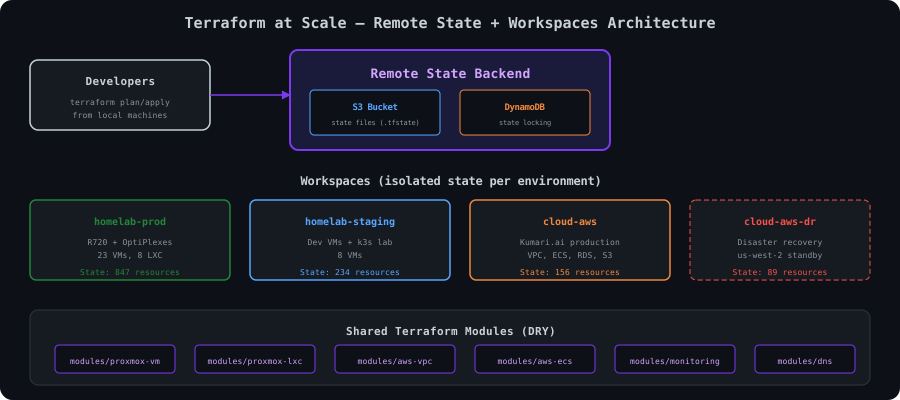
The Tipping Point
Every Terraform project starts the same way. A single
main.tfvariables.tfMy inflection point came on a Tuesday night. I was adding a new LXC container for a Loki instance and ran
terraform planBash7 lines1resham@devbox:~/homelab-iac/terraform$ time terraform plan 2... 3Plan: 1 to add, 0 to change, 0 to destroy. 4 5real 4m12.387s 6user 0m8.241s 7sys 0m1.093s
Four minutes. To add a single container. Terraform was refreshing every resource in state — every VM, every DNS record, every firewall rule, every AWS ECS service — just to tell me it needed to create one LXC.
I opened
main.tffor_eachIt was a mess. And I was the one who made it.
The real wake-up call came a week later when my laptop's SSD died. I had the Terraform code in git, sure. But the state file? Local.
terraform.tfstate.gitignoreI spent that weekend recreating state by hand. Importing resources one at a time. Forty-seven
terraform importRemote State: The Foundation
The first thing I fixed was state storage. If your Terraform state is local, stop reading this and go fix that. Right now. I'll wait.
Here's my backend configuration:
HCL14 lines1# backend.tf 2terraform { 3 backend "s3" { 4 bucket = "kumari-terraform-state" 5 key = "infrastructure/terraform.tfstate" 6 region = "us-east-1" 7 encrypt = true 8 dynamodb_table = "terraform-state-lock" 9 10 # I use a dedicated IAM user for state access 11 # with minimal permissions — just S3 and DynamoDB 12 profile = "terraform-state" 13 } 14}
The S3 bucket has versioning enabled. Every time Terraform writes state, S3 keeps the previous version. This has saved me twice — once when a bad apply corrupted state, and once when I accidentally removed a resource block without running
state rmHCL59 lines1# state-backend/main.tf 2# I manage the state backend itself with a SEPARATE Terraform config 3# that uses local state. Yes, it's turtles all the way down. 4 5provider "aws" { 6 region = "us-east-1" 7 profile = "terraform-admin" 8} 9 10resource "aws_s3_bucket" "terraform_state" { 11 bucket = "kumari-terraform-state" 12 13 tags = { 14 Name = "Terraform State" 15 ManagedBy = "terraform" 16 Environment = "global" 17 } 18} 19 20resource "aws_s3_bucket_versioning" "terraform_state" { 21 bucket = aws_s3_bucket.terraform_state.id 22 versioning_configuration { 23 status = "Enabled" 24 } 25} 26 27resource "aws_s3_bucket_server_side_encryption_configuration" "terraform_state" { 28 bucket = aws_s3_bucket.terraform_state.id 29 rule { 30 apply_server_side_encryption_by_default { 31 sse_algorithm = "aws:kms" 32 } 33 } 34} 35 36resource "aws_s3_bucket_public_access_block" "terraform_state" { 37 bucket = aws_s3_bucket.terraform_state.id 38 39 block_public_acls = true 40 block_public_policy = true 41 ignore_public_acls = true 42 restrict_public_buckets = true 43} 44 45resource "aws_dynamodb_table" "terraform_lock" { 46 name = "terraform-state-lock" 47 billing_mode = "PAY_PER_REQUEST" 48 hash_key = "LockID" 49 50 attribute { 51 name = "LockID" 52 type = "S" 53 } 54 55 tags = { 56 Name = "Terraform State Lock" 57 ManagedBy = "terraform" 58 } 59}
The DynamoDB table is critical. Without it, if two people (or two CI jobs, or you in two terminal tabs — don't ask how I know) run
terraform applyCODE10 lines1Error: Error acquiring the state lock 2 3Error message: ConditionalCheckFailedException: The conditional request failed 4Lock Info: 5 ID: a1b2c3d4-e5f6-7890-abcd-ef1234567890 6 Path: kumari-terraform-state/infrastructure/terraform.tfstate 7 Operation: OperationTypeApply 8 Who: resham@devbox 9 Version: 1.9.8 10 Created: 2026-03-18 02:14:33.048293 +0000 UTC
The
WhoWorkspaces: One Codebase, Four Environments
My infrastructure spans four distinct environments:
- homelab-prod — The Proxmox cluster running actual services. Grafana, Prometheus, DNS, media, the NAS.
- homelab-staging — A smaller set of VMs where I test changes before rolling them to prod. Yes, I have staging for my homelab. I've been burned enough times.
- cloud-aws — Production AWS infrastructure for Kumari.ai. ECS, RDS, ElastiCache, CloudFront, the works.
- cloud-aws-dr — Disaster recovery in us-west-2. Minimal footprint, ready to scale up.
Terraform workspaces give each environment its own state file within the same backend:
Bash16 lines1# Create workspaces 2terraform workspace new homelab-prod 3terraform workspace new homelab-staging 4terraform workspace new cloud-aws 5terraform workspace new cloud-aws-dr 6 7# Switch between them 8terraform workspace select homelab-prod 9 10# List all workspaces 11resham@devbox:~/homelab-iac/terraform$ terraform workspace list 12 default 13 homelab-prod 14* homelab-staging 15 cloud-aws 16 cloud-aws-dr
Each workspace uses a different
.tfvarsHCL40 lines1# envs/homelab-prod.tfvars 2environment = "homelab-prod" 3proxmox_api_url = "https://pve1.internal.resham.dev:8006/api2/json" 4proxmox_node = "pve1" 5vm_defaults = { 6 cores = 2 7 memory = 2048 8 disk = "local-zfs" 9 bridge = "vmbr0" 10 os_type = "cloud-init" 11 template = "ubuntu-2404-cloud" 12} 13monitoring_enabled = true 14backup_schedule = "0 2 * * *" 15 16# envs/homelab-staging.tfvars 17environment = "homelab-staging" 18proxmox_api_url = "https://pve3.internal.resham.dev:8006/api2/json" 19proxmox_node = "pve3" 20vm_defaults = { 21 cores = 1 22 memory = 1024 23 disk = "local-zfs" 24 bridge = "vmbr1" # Isolated staging VLAN 25 os_type = "cloud-init" 26 template = "ubuntu-2404-cloud" 27} 28monitoring_enabled = false 29backup_schedule = "" # No backups for staging 30 31# envs/cloud-aws.tfvars 32environment = "cloud-aws" 33aws_region = "us-east-1" 34vpc_cidr = "10.100.0.0/16" 35ecs_cluster_name = "kumari-prod" 36rds_instance_class = "db.r6g.large" 37redis_node_type = "cache.r6g.large" 38enable_waf = true 39min_ecs_tasks = 2 40max_ecs_tasks = 20
The plan/apply commands always specify the vars file explicitly:
Bash2 lines1terraform plan -var-file="envs/$(terraform workspace show).tfvars" 2terraform apply -var-file="envs/$(terraform workspace show).tfvars"
I have a shell alias for this because I got tired of typing it:
Bash3 lines1# ~/.zshrc 2tplan() { terraform plan -var-file="envs/$(terraform workspace show).tfvars" "$@"; } 3tapply() { terraform apply -var-file="envs/$(terraform workspace show).tfvars" "$@"; }
One lesson learned the painful way: always check which workspace you're in before running apply. I once applied homelab-staging config to homelab-prod because I forgot to switch. Downscaled every VM to 1 core and 1GB RAM. My monitoring stack collapsed, which meant I didn't even get alerts about it. Found out when Nextcloud became unusable.
Now my shell prompt shows the active workspace:
Bash6 lines1# Part of my starship.toml 2[custom.terraform] 3command = "terraform workspace show 2>/dev/null" 4when = "test -f main.tf" 5format = "[tf:$output]($style) " 6style = "bold purple"
Module Architecture
Here's the directory structure after the refactor:
Bash41 lines1resham@devbox:~/homelab-iac/terraform$ tree -L 3 2. 3├── backend.tf 4├── main.tf # Root module — just module calls 5├── variables.tf 6├── outputs.tf 7├── versions.tf 8├── envs/ 9│ ├── homelab-prod.tfvars 10│ ├── homelab-staging.tfvars 11│ ├── cloud-aws.tfvars 12│ └── cloud-aws-dr.tfvars 13├── modules/ 14│ ├── proxmox-vm/ 15│ │ ├── main.tf 16│ │ ├── variables.tf 17│ │ ├── outputs.tf 18│ │ └── versions.tf 19│ ├── proxmox-lxc/ 20│ │ ├── main.tf 21│ │ ├── variables.tf 22│ │ ├── outputs.tf 23│ │ └── versions.tf 24│ ├── aws-vpc/ 25│ │ ├── main.tf 26│ │ ├── variables.tf 27│ │ ├── outputs.tf 28│ │ └── versions.tf 29│ ├── aws-ecs/ 30│ │ ├── main.tf 31│ │ ├── variables.tf 32│ │ ├── outputs.tf 33│ │ └── versions.tf 34│ ├── monitoring/ 35│ │ ├── main.tf 36│ │ ├── variables.tf 37│ │ └── outputs.tf 38│ └── dns/ 39│ ├── main.tf 40│ ├── variables.tf 41│ └── outputs.tf
Here's the complete
proxmox-vmHCL110 lines1# modules/proxmox-vm/versions.tf 2terraform { 3 required_version = ">= 1.9.0" 4 required_providers { 5 proxmox = { 6 source = "Telmate/proxmox" 7 version = "~> 3.0" 8 } 9 } 10} 11 12# modules/proxmox-vm/variables.tf 13variable "vms" { 14 description = "Map of VMs to create" 15 type = map(object({ 16 cores = optional(number, 2) 17 memory = optional(number, 2048) 18 disk_size = optional(string, "20G") 19 disk_storage = optional(string, "local-zfs") 20 bridge = optional(string, "vmbr0") 21 vlan_tag = optional(number, -1) 22 ip_address = optional(string) 23 gateway = optional(string, "10.0.0.1") 24 dns_servers = optional(string, "10.0.0.5") 25 template = optional(string, "ubuntu-2404-cloud") 26 onboot = optional(bool, true) 27 tags = optional(list(string), []) 28 description = optional(string, "") 29 })) 30} 31 32variable "target_node" { 33 description = "Proxmox node to deploy VMs on" 34 type = string 35} 36 37variable "ssh_keys" { 38 description = "SSH public keys for cloud-init" 39 type = string 40 sensitive = true 41} 42 43variable "default_user" { 44 description = "Default user created by cloud-init" 45 type = string 46 default = "resham" 47} 48 49# modules/proxmox-vm/main.tf 50resource "proxmox_vm_qemu" "vm" { 51 for_each = var.vms 52 53 name = each.key 54 target_node = var.target_node 55 clone = each.value.template 56 full_clone = true 57 agent = 1 58 onboot = each.value.onboot 59 cores = each.value.cores 60 memory = each.value.memory 61 scsihw = "virtio-scsi-single" 62 tags = join(";", each.value.tags) 63 desc = each.value.description 64 65 disks { 66 scsi { 67 scsi0 { 68 disk { 69 size = each.value.disk_size 70 storage = each.value.disk_storage 71 } 72 } 73 } 74 } 75 76 network { 77 model = "virtio" 78 bridge = each.value.bridge 79 tag = each.value.vlan_tag 80 } 81 82 os_type = "cloud-init" 83 ciuser = var.default_user 84 sshkeys = var.ssh_keys 85 ipconfig0 = each.value.ip_address != null ? "ip=${each.value.ip_address}/24,gw=${each.value.gateway}" : "ip=dhcp" 86 nameserver = each.value.dns_servers 87 88 lifecycle { 89 ignore_changes = [ 90 network, # Proxmox sometimes reorders network devices 91 desc, # Don't fight manual description edits 92 ] 93 } 94} 95 96# modules/proxmox-vm/outputs.tf 97output "vm_ids" { 98 description = "Map of VM names to their Proxmox VMIDs" 99 value = { for name, vm in proxmox_vm_qemu.vm : name => vm.vmid } 100} 101 102output "vm_ips" { 103 description = "Map of VM names to their IP addresses" 104 value = { for name, vm in proxmox_vm_qemu.vm : name => vm.default_ipv4_address } 105} 106 107output "vm_names" { 108 description = "List of all VM names created by this module" 109 value = keys(proxmox_vm_qemu.vm) 110}
And the root module calls it like this:
HCL60 lines1# main.tf (root module) 2module "monitoring" { 3 source = "./modules/proxmox-vm" 4 target_node = var.proxmox_node 5 ssh_keys = var.ssh_public_key 6 7 vms = { 8 "grafana" = { 9 cores = 2 10 memory = 4096 11 disk_size = "50G" 12 ip_address = "10.0.0.20" 13 tags = ["monitoring", "prod"] 14 } 15 "prometheus" = { 16 cores = 4 17 memory = 8192 18 disk_size = "200G" 19 ip_address = "10.0.0.21" 20 tags = ["monitoring", "prod"] 21 } 22 "loki" = { 23 cores = 2 24 memory = 4096 25 disk_size = "100G" 26 ip_address = "10.0.0.22" 27 tags = ["monitoring", "prod"] 28 } 29 } 30} 31 32module "services" { 33 source = "./modules/proxmox-vm" 34 target_node = var.proxmox_node 35 ssh_keys = var.ssh_public_key 36 37 vms = { 38 "nginx-proxy" = { 39 cores = 2 40 memory = 2048 41 disk_size = "20G" 42 ip_address = "10.0.0.10" 43 tags = ["network", "prod"] 44 } 45 "docker-host-01" = { 46 cores = 4 47 memory = 16384 48 disk_size = "100G" 49 ip_address = "10.0.0.30" 50 tags = ["docker", "prod"] 51 } 52 "docker-host-02" = { 53 cores = 4 54 memory = 16384 55 disk_size = "100G" 56 ip_address = "10.0.0.31" 57 tags = ["docker", "prod"] 58 } 59 } 60}
The DRY principle in action. Before modules, each VM was a separate 25-line resource block. Fifteen VMs meant 375 lines just for VM definitions, with every parameter copy-pasted and slightly different. Now the module handles the boilerplate, and the root config is just a clean map of what I actually care about: name, resources, IP.
State Surgery
This is the section that gives Terraform practitioners cold sweats.
When I refactored from a flat structure to modules, every resource path changed. What was
proxmox_vm_qemu.grafanamodule.monitoring.proxmox_vm_qemu.vm["grafana"]terraform planCODE1 linePlan: 15 to add, 0 to change, 15 to destroy.
Fifteen VMs destroyed and recreated. Production services down. Data lost. Not acceptable.
Instead, I used
terraform state mvBash25 lines1# Move monitoring VMs into the monitoring module 2terraform state mv \ 3 'proxmox_vm_qemu.grafana' \ 4 'module.monitoring.proxmox_vm_qemu.vm["grafana"]' 5 6terraform state mv \ 7 'proxmox_vm_qemu.prometheus' \ 8 'module.monitoring.proxmox_vm_qemu.vm["prometheus"]' 9 10terraform state mv \ 11 'proxmox_vm_qemu.loki' \ 12 'module.monitoring.proxmox_vm_qemu.vm["loki"]' 13 14# Move service VMs into the services module 15terraform state mv \ 16 'proxmox_vm_qemu.nginx_proxy' \ 17 'module.services.proxmox_vm_qemu.vm["nginx-proxy"]' 18 19terraform state mv \ 20 'proxmox_vm_qemu.docker_host_01' \ 21 'module.services.proxmox_vm_qemu.vm["docker-host-01"]' 22 23terraform state mv \ 24 'proxmox_vm_qemu.docker_host_02' \ 25 'module.services.proxmox_vm_qemu.vm["docker-host-02"]'
Each command outputs something like:
CODE3 lines1Move "proxmox_vm_qemu.grafana" to 2 "module.monitoring.proxmox_vm_qemu.vm[\"grafana\"]" 3Successfully moved 1 object(s).
After all the moves, the moment of truth:
Bash3 lines1resham@devbox:~/homelab-iac/terraform$ terraform plan -var-file="envs/homelab-prod.tfvars" 2 3No changes. Your infrastructure matches the configuration.
I have never felt more relief from a terminal output in my life.
The rules I follow for state surgery:
- Always back up state first. CODE1 line
terraform state pull > state-backup-$(date +%Y%m%d-%H%M%S).json - Do it during a maintenance window. Lock deploys. Tell anyone who touches the infra.
- Move one resource at a time. Run after each move to catch mistakes early.CODE1 line
terraform plan - Never combine state moves with code changes. Move state first, verify with plan, then merge the code.
For resources that should no longer be managed by Terraform (maybe you're moving them to a different tool, or they're being decommissioned manually):
Bash4 lines1# Remove from state without destroying the resource 2terraform state rm 'module.legacy.proxmox_vm_qemu.vm["old-jenkins"]' 3# Removed module.legacy.proxmox_vm_qemu.vm["old-jenkins"] 4# The VM keeps running. Terraform just forgets about it.
I used
state rmThe Import That Saved My Weekend
This is the story from the title.
It was a Saturday morning. I'd been running my Proxmox cluster for about eight months, and over that time I'd created fifteen VMs manually through the Proxmox web UI. Dev boxes, test environments, a Minecraft server for friends, a Kali box for security practice. None of them were in Terraform.
Every time I ran
terraform planSo I decided to import them. All of them. On a Saturday.
The process for each VM:
Step 1: Write the resource block that matches the existing VM
HCL19 lines1# I had to look up each VM's config in Proxmox first 2# pvesh get /nodes/pve1/qemu/110/config 3 4module "dev_vms" { 5 source = "./modules/proxmox-vm" 6 target_node = "pve1" 7 ssh_keys = var.ssh_public_key 8 9 vms = { 10 "devbox-golang" = { 11 cores = 4 12 memory = 8192 13 disk_size = "80G" 14 ip_address = "10.0.0.50" 15 tags = ["dev", "golang"] 16 } 17 # ... 14 more VMs 18 } 19}
Step 2: Import each VM into state
Bash26 lines1# The format is: terraform import <address> <proxmox_node>/<vmtype>/<vmid> 2terraform import \ 3 'module.dev_vms.proxmox_vm_qemu.vm["devbox-golang"]' \ 4 pve1/qemu/110 5 6terraform import \ 7 'module.dev_vms.proxmox_vm_qemu.vm["devbox-rust"]' \ 8 pve1/qemu/111 9 10terraform import \ 11 'module.dev_vms.proxmox_vm_qemu.vm["minecraft"]' \ 12 pve2/qemu/200 13 14terraform import \ 15 'module.dev_vms.proxmox_vm_qemu.vm["kali-lab"]' \ 16 pve2/qemu/201 17 18terraform import \ 19 'module.dev_vms.proxmox_vm_qemu.vm["pihole-primary"]' \ 20 pve1/qemu/105 21 22terraform import \ 23 'module.dev_vms.proxmox_vm_qemu.vm["pihole-secondary"]' \ 24 pve3/qemu/106 25 26# ... and so on for all 15 VMs
Each import took about 10-15 seconds as Terraform queried the Proxmox API:
CODE9 lines1module.dev_vms.proxmox_vm_qemu.vm["devbox-golang"]: Importing from ID "pve1/qemu/110"... 2module.dev_vms.proxmox_vm_qemu.vm["devbox-golang"]: Import prepared! 3 Prepared proxmox_vm_qemu for import 4module.dev_vms.proxmox_vm_qemu.vm["devbox-golang"]: Refreshing state... [id=pve1/qemu/110] 5 6Import successful! 7 8The resources that were imported are shown above. These resources are now in 9your Terraform state and will henceforth be managed by Terraform.
Step 3: Iterate until plan is clean
This was the tedious part. After importing, I'd run
terraform planCODE8 lines1# module.dev_vms.proxmox_vm_qemu.vm["devbox-golang"] will be updated in-place 2 ~ resource "proxmox_vm_qemu" "vm" { 3 ~ cores = 4 -> 2 # Oops, it actually had 2 cores 4 ~ memory = 8192 -> 4096 # And 4GB, not 8GB 5 name = "devbox-golang" 6 ~ scsihw = "virtio-scsi-single" -> "lsi" # Different SCSI controller 7 # (12 unchanged attributes hidden) 8 }
So I'd update my HCL to match reality, run plan again, fix more discrepancies, repeat. For fifteen VMs. Some had settings I didn't even know I'd configured — NUMA topology, CPU types, specific BIOS settings.
It took about four hours. Fifteen VMs. Lots of
pvesh getBut at the end:
Bash3 lines1resham@devbox:~/homelab-iac/terraform$ terraform plan -var-file="envs/homelab-prod.tfvars" 2 3No changes. Your infrastructure matches the configuration.
Fifteen VMs, fully managed. If my house burns down tomorrow, I can
terraform applyHandling Drift
Drift is what happens when reality diverges from your Terraform state. And in a homelab, it happens constantly, because sometimes it's 11 PM and you just need to bump a VM's RAM from the Proxmox UI and you'll "fix it in Terraform later."
You won't fix it later. You'll forget, and three weeks from now you'll run
terraform planCODE6 lines1# module.services.proxmox_vm_qemu.vm["docker-host-01"] will be updated in-place 2 ~ resource "proxmox_vm_qemu" "vm" { 3 ~ memory = 32768 -> 16384 4 name = "docker-host-01" 5 # (15 unchanged attributes hidden) 6 }
Terraform wants to revert the memory back to what's in your config (16GB) because you manually bumped it to 32GB three weeks ago. If you apply this, your Docker host loses half its RAM and every container on it starts OOMing.
I handle drift two ways:
Option 1: Update the config to match reality
HCL8 lines1# If the manual change was intentional, update the HCL 2"docker-host-01" = { 3 cores = 4 4 memory = 32768 # Updated from 16384 — bumped for memory-hungry containers 5 disk_size = "100G" 6 ip_address = "10.0.0.30" 7 tags = ["docker", "prod"] 8}
Option 2: Revert the manual change
If the manual change was a mistake or a temporary fix, let Terraform revert it:
Bash1 lineterraform apply -var-file="envs/homelab-prod.tfvars" -target='module.services.proxmox_vm_qemu.vm["docker-host-01"]'
Option 3: Ignore it (carefully)
For attributes that you know will drift and you don't care about, use
lifecycle.ignore_changesHCL7 lines1lifecycle { 2 ignore_changes = [ 3 network, # Proxmox reorders NICs sometimes 4 desc, # I edit descriptions in the UI 5 tags, # Tags get added by automation scripts 6 ] 7}
Be very careful with
ignore_changesI run a weekly drift check as a cron job:
Bash10 lines1# /etc/cron.d/terraform-drift-check 20 8 * * 1 resham cd /home/resham/homelab-iac/terraform && \ 3 terraform workspace select homelab-prod && \ 4 terraform plan -var-file="envs/homelab-prod.tfvars" -detailed-exitcode -no-color \ 5 > /tmp/terraform-drift-report.txt 2>&1; \ 6 if [ $? -eq 2 ]; then \ 7 curl -X POST "$DISCORD_WEBHOOK" \ 8 -H "Content-Type: application/json" \ 9 -d "{\"content\": \"Terraform drift detected in homelab-prod. Check /tmp/terraform-drift-report.txt\"}"; \ 10 fi
The
-detailed-exitcodeSensitive Values: The Hard Lesson
Let me tell you about the worst commit I've ever made.
It was early in my Terraform journey. I had a
terraform.tfvarsNow, it was a private repo. Nobody saw it. But the credentials were in the git history forever. Even after I deleted the file,
git logHere's how I fixed it:
Bash12 lines1# Step 1: Rotate every compromised credential immediately 2# Don't clean up first. Rotate FIRST. Assume compromise. 3 4# Step 2: Remove the file from ALL git history 5pip install git-filter-repo 6git filter-repo --invert-paths --path terraform.tfvars --force 7 8# Step 3: Force push (only time I'll advocate for force push) 9git push origin --force --all 10 11# Step 4: Tell GitHub to garbage collect 12# (GitHub support can do this for you if you ask nicely)
After that experience, here's my hierarchy for sensitive values:
Tier 1: Environment variables (for CI/CD)
Bash3 lines1export TF_VAR_proxmox_api_token="your-token-here" 2export TF_VAR_aws_access_key="AKIA..." 3export TF_VAR_cloudflare_api_token="..."
Terraform automatically reads
TF_VAR_<name>Tier 2: .tfvars with .gitignore (for local development)
Bash4 lines1# .gitignore 2*.tfvars 3!envs/*.tfvars # Non-sensitive workspace configs ARE committed 4secrets.tfvars # Explicit ignore
Bash4 lines1# secrets.tfvars — NEVER committed 2proxmox_api_token = "xxxxxxxx-xxxx-xxxx-xxxx-xxxxxxxxxxxx" 3ssh_public_key = "ssh-ed25519 AAAA... resham@devbox" 4cloudflare_api_token = "..."
Bash1 lineterraform plan -var-file="envs/homelab-prod.tfvars" -var-file="secrets.tfvars"
Tier 3: HashiCorp Vault (for production)
HCL9 lines1data "vault_generic_secret" "aws_creds" { 2 path = "secret/terraform/aws" 3} 4 5provider "aws" { 6 access_key = data.vault_generic_secret.aws_creds.data["access_key"] 7 secret_key = data.vault_generic_secret.aws_creds.data["secret_key"] 8 region = var.aws_region 9}
I use Vault for the AWS production infrastructure. For the homelab, environment variables are sufficient — the blast radius of a leaked Proxmox token on my local network is limited.
Also: mark sensitive variables as
sensitive = trueHCL5 lines1variable "proxmox_api_token" { 2 description = "Proxmox API token" 3 type = string 4 sensitive = true 5}
CODE2 lines1# Plan output shows: 2 + proxmox_api_token = (sensitive value)
CI/CD for Terraform
Manual applies are fine when you're learning. They're not fine when you're managing production infrastructure for a real product. Here's my GitHub Actions workflow:
YAML128 lines1# .github/workflows/terraform.yml 2name: Terraform 3 4on: 5 pull_request: 6 branches: [main] 7 paths: 8 - 'terraform/**' 9 push: 10 branches: [main] 11 paths: 12 - 'terraform/**' 13 14permissions: 15 contents: read 16 pull-requests: write 17 id-token: write 18 19env: 20 TF_VERSION: "1.9.8" 21 AWS_REGION: "us-east-1" 22 23jobs: 24 plan: 25 name: "Terraform Plan" 26 runs-on: ubuntu-latest 27 if: github.event_name == 'pull_request' 28 strategy: 29 matrix: 30 workspace: [homelab-prod, cloud-aws, cloud-aws-dr] 31 steps: 32 - uses: actions/checkout@v4 33 34 - uses: hashicorp/setup-terraform@v3 35 with: 36 terraform_version: ${{ env.TF_VERSION }} 37 38 - name: Configure AWS Credentials 39 uses: aws-actions/configure-aws-credentials@v4 40 with: 41 role-to-arn: arn:aws:iam::role/terraform-github-actions 42 aws-region: ${{ env.AWS_REGION }} 43 44 - name: Terraform Init 45 working-directory: terraform 46 run: terraform init 47 48 - name: Select Workspace 49 working-directory: terraform 50 run: terraform workspace select ${{ matrix.workspace }} 51 52 - name: Terraform Plan 53 id: plan 54 working-directory: terraform 55 run: | 56 terraform plan \ 57 -var-file="envs/${{ matrix.workspace }}.tfvars" \ 58 -no-color \ 59 -out=tfplan-${{ matrix.workspace }} \ 60 2>&1 | tee plan-output.txt 61 env: 62 TF_VAR_proxmox_api_token: ${{ secrets.PROXMOX_API_TOKEN }} 63 TF_VAR_ssh_public_key: ${{ secrets.SSH_PUBLIC_KEY }} 64 TF_VAR_cloudflare_api_token: ${{ secrets.CLOUDFLARE_API_TOKEN }} 65 66 - name: Comment Plan on PR 67 uses: actions/github-script@v7 68 with: 69 script: | 70 const fs = require('fs'); 71 const plan = fs.readFileSync('terraform/plan-output.txt', 'utf8'); 72 const workspace = '${{ matrix.workspace }}'; 73 const body = `### Terraform Plan: \`${workspace}\` 74 \`\`\`hcl 75 ${plan.substring(0, 65000)} 76 \`\`\``; 77 github.rest.issues.createComment({ 78 issue_number: context.issue.number, 79 owner: context.repo.owner, 80 repo: context.repo.repo, 81 body: body 82 }); 83 84 - name: Upload Plan Artifact 85 uses: actions/upload-artifact@v4 86 with: 87 name: tfplan-${{ matrix.workspace }} 88 path: terraform/tfplan-${{ matrix.workspace }} 89 90 apply: 91 name: "Terraform Apply" 92 runs-on: ubuntu-latest 93 if: github.event_name == 'push' && github.ref == 'refs/heads/main' 94 environment: production # Requires manual approval in GitHub 95 strategy: 96 matrix: 97 workspace: [homelab-prod, cloud-aws, cloud-aws-dr] 98 steps: 99 - uses: actions/checkout@v4 100 101 - uses: hashicorp/setup-terraform@v3 102 with: 103 terraform_version: ${{ env.TF_VERSION }} 104 105 - name: Configure AWS Credentials 106 uses: aws-actions/configure-aws-credentials@v4 107 with: 108 role-to-arn: arn:aws:iam::role/terraform-github-actions 109 aws-region: ${{ env.AWS_REGION }} 110 111 - name: Terraform Init 112 working-directory: terraform 113 run: terraform init 114 115 - name: Select Workspace 116 working-directory: terraform 117 run: terraform workspace select ${{ matrix.workspace }} 118 119 - name: Terraform Apply 120 working-directory: terraform 121 run: | 122 terraform apply \ 123 -var-file="envs/${{ matrix.workspace }}.tfvars" \ 124 -auto-approve 125 env: 126 TF_VAR_proxmox_api_token: ${{ secrets.PROXMOX_API_TOKEN }} 127 TF_VAR_ssh_public_key: ${{ secrets.SSH_PUBLIC_KEY }} 128 TF_VAR_cloudflare_api_token: ${{ secrets.CLOUDFLARE_API_TOKEN }}
The key design decisions:
- Plan on PR, apply on merge. You review the plan in the PR comments before approving.
- Matrix strategy runs plan/apply for each workspace in parallel. If cloud-aws has issues, homelab-prod still applies.
- The environment in GitHub requires manual approval. Merging to main doesn't automatically apply — a human has to click "Approve" in the Actions UI.CODE1 line
production - Plan artifacts are saved so the apply uses the exact same plan that was reviewed, not a new one.
Performance: From 4 Minutes to 18 Seconds
The biggest win was splitting resources into modules with separate state consideration. But there are several other tricks:
Targeted plans when you know what you're changing:
Bash5 lines1# Only plan the monitoring module 2terraform plan -var-file="envs/homelab-prod.tfvars" \ 3 -target=module.monitoring 4 5# Plan time: 3 seconds instead of 18
Parallelism tuning:
Bash6 lines1# Default parallelism is 10. For my Proxmox API that can't handle many 2# concurrent requests, I lower it: 3terraform apply -var-file="envs/homelab-prod.tfvars" -parallelism=5 4 5# For AWS with high API rate limits, I raise it: 6terraform apply -var-file="envs/cloud-aws.tfvars" -parallelism=30
Skip refresh when you know nothing changed:
Bash3 lines1# Useful for rapid iteration on HCL syntax 2terraform plan -var-file="envs/homelab-prod.tfvars" -refresh=false 3# Plan time: 2 seconds (no API calls)
Be careful with
-refresh=falseState splitting was the nuclear option. When I realized the homelab and AWS resources didn't need to be in the same state at all, I split them into separate root modules:
Bash13 lines1terraform/ 2├── homelab/ # Proxmox resources only 3│ ├── backend.tf # key = "homelab/terraform.tfstate" 4│ ├── main.tf 5│ └── ... 6├── cloud/ # AWS resources only 7│ ├── backend.tf # key = "cloud/terraform.tfstate" 8│ ├── main.tf 9│ └── ... 10└── shared/ # DNS, monitoring that spans both 11 ├── backend.tf # key = "shared/terraform.tfstate" 12 ├── main.tf 13 └── ...
When
shared/homelab/cloud/terraform_remote_stateHCL27 lines1# shared/data.tf 2data "terraform_remote_state" "homelab" { 3 backend = "s3" 4 config = { 5 bucket = "kumari-terraform-state" 6 key = "homelab/terraform.tfstate" 7 region = "us-east-1" 8 } 9} 10 11data "terraform_remote_state" "cloud" { 12 backend = "s3" 13 config = { 14 bucket = "kumari-terraform-state" 15 key = "cloud/terraform.tfstate" 16 region = "us-east-1" 17 } 18} 19 20# Now I can reference outputs from other states 21resource "cloudflare_record" "grafana" { 22 zone_id = var.cloudflare_zone_id 23 name = "grafana" 24 content = data.terraform_remote_state.homelab.outputs.monitoring_vm_ips["grafana"] 25 type = "A" 26 proxied = true 27}
This alone cut plan time by 60% because each state only refreshes its own resources.
Disaster Recovery
State files are the crown jewels. If you lose state, Terraform doesn't know what it manages. You're back to importing everything by hand. Here's my backup strategy:
Layer 1: S3 versioning. Every state write creates a new version. I can roll back to any previous state.
Bash15 lines1# List state file versions 2aws s3api list-object-versions \ 3 --bucket kumari-terraform-state \ 4 --prefix "homelab/terraform.tfstate" \ 5 --max-items 5 6 7# Restore a previous version 8aws s3api get-object \ 9 --bucket kumari-terraform-state \ 10 --key "homelab/terraform.tfstate" \ 11 --version-id "abc123..." \ 12 restored-state.json 13 14# Push restored state 15terraform state push restored-state.json
Layer 2: Pre-apply state backup. My CI/CD workflow pulls state before every apply:
Bash1 lineterraform state pull > "backups/state-$(date +%Y%m%d-%H%M%S)-pre-apply.json"
Layer 3: Cross-region replication. The S3 bucket replicates to us-west-2. If us-east-1 goes down, my state is still accessible.
When state gets corrupted (it happened once, after a crash during apply):
Bash11 lines1# Check state integrity 2terraform state list 3# If this errors, state is corrupted 4 5# Option 1: Roll back to last good version from S3 6aws s3api list-object-versions --bucket kumari-terraform-state \ 7 --prefix "homelab/terraform.tfstate" --max-items 10 8 9# Option 2: If lock is stuck from the crashed process 10terraform force-unlock LOCK_ID_HERE 11# Only use this if you're SURE no other process is running
terraform force-unlockThe Numbers
After six months of iterating on this setup:
| Metric | Before | After |
|---|---|---|
| Total managed resources | ~80 (rest unmanaged) | 1,237 |
| Plan time (full) | 4 min 12 sec | 18 sec |
| Plan time (targeted) | N/A | 2-5 sec |
| State files | 1 (local) | 4 (remote, locked) |
| Manual infrastructure changes | Weekly | Zero in 6 months |
| Time to recreate full environment | "Unknown, pray it doesn't happen" | ~45 min |
| CI/CD pipeline | None | Plan on PR, apply on merge |
| Secrets committed to git | 1 (that I know of) | 0 |
The 1,237 resources break down roughly as:
- Homelab prod: 487 resources (VMs, LXCs, storage, network, firewall rules)
- Homelab staging: 89 resources (minimal mirror of prod)
- Cloud AWS: 584 resources (VPC, subnets, ECS services, RDS, ElastiCache, CloudFront, WAF rules, IAM, the whole stack)
- Cloud AWS DR: 77 resources (warm standby, ready to scale)
What I'd Do Differently
If I could go back and start over:
- Remote state from day one. Not day thirty. Not "when I have more resources." Day one.
- Modules from the start. Even if you only have three resources, put them in a module. You'll thank yourself in six months.
- Never make manual changes. Not even "just this once." The five minutes you save now becomes two hours of drift debugging later.
- Use instead ofCODE1 line
for_each. I started withCODE1 linecountfor my VMs and regretted it immediately. Removing a VM from the middle of a list reindexes everything.CODE1 linecountwith a map is the way.CODE1 linefor_each - Tag everything. Tags are free. Put the environment, the owner, the Terraform workspace, and the module that manages the resource. Future you running will appreciate it.CODE1 line
terraform state list | grep monitoring
The homelab is where I make my mistakes so that Kumari.ai's production infrastructure doesn't suffer them. Every pattern in this post — remote state, workspace isolation, module architecture, CI/CD gates — started as a homelab experiment before I trusted it with customer data.
Terraform is not a tool you master by reading docs. It's a tool you master by running
terraform planMy state files are backed up. My locks are working. My drift checks are running. And I haven't touched the Proxmox UI in six months.
That's the goal.